
TL;DR: Google’s latest Channel Prioritization and Budget Allocation features give advertisers greater influence over spending across Search, Shopping, Performance Max, and Demand Gen campaigns. Here’s how they work, what changes, and how PPC specialists can use them to improve campaign efficiency.
Based on the current setup Paid Search specialists had in the UI, Google Ads gave limited control over how automated campaigns distribute budgets across its different networks or channels.
This challenge has been particularly noticeable in Performance Max campaigns, where Google’s automation determines how much budget goes to inventory across Search, Shopping, YouTube, Display, Gmail, Discover, and Maps (ads placement in Maps is fairly new).
While automation offers significant advantages in identifying conversion opportunities, and less headache of every day manual intervention, advertisers haven’t always had sufficient control over where their money is spent.
Think of a Performance Max campaign generating profitable conversions across Google’s owned properties while struggling to deliver comparable results through the GDN or Discover.
Previously, advertisers had limited options for directly influencing that distribution within the campaign.
Google’s newly introduced Channel Prioritization and Budget Allocation controls aim to address this challenge.
Only a couple of weeks ago or so, Google announced this, that these features allow a PPC guy/girl like you and me, to assign different priorities to advertising channels and introduce spending limits for selected lower-priority inventory.
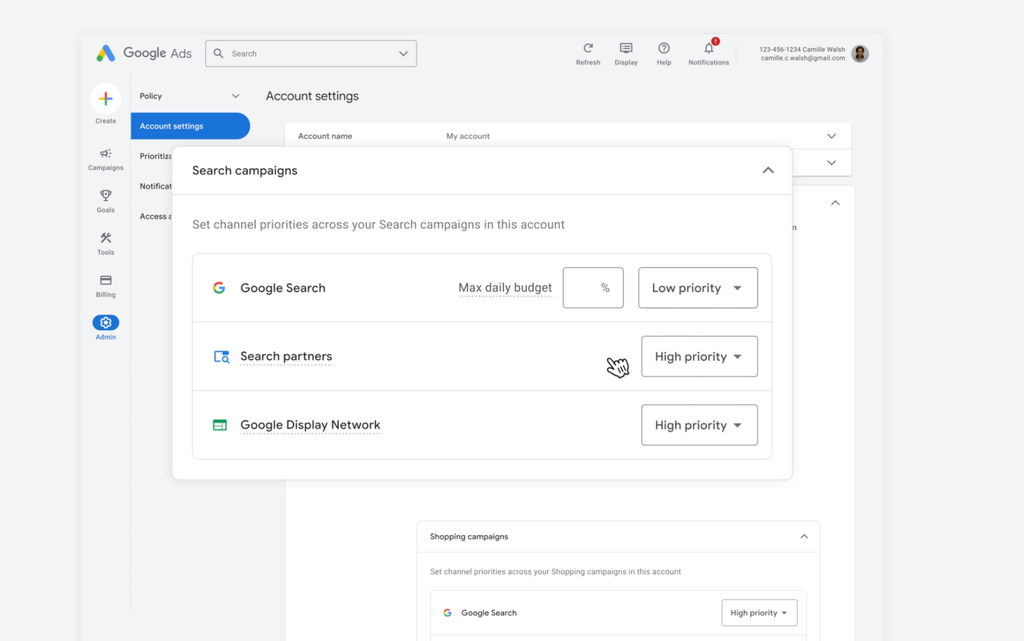
What Is Channel Prioritization in Google Ads?
Channel Prioritization is a new Google Ads setting that allows advertisers to influence how campaign budgets are distributed across eligible advertising channels.
Instead of treating all enabled networks equally, or simply turning on or off, we can now assign each available channel one of two priority levels:
- High Priority: Google attempts to allocate budget to these channels first, respecting performance targets when Target CPA or Target ROAS bidding is used.
- Low Priority: Google considers these channels after higher-priority opportunities, with the option to limit how much budget they receive where budget allocation controls are supported.
By default, all eligible channels are assigned High Priority.
The feature provides additional direction to Google’s bidding and budget allocation systems without requiring advertisers to disable entire networks.
For example, suppose a Search campaign runs across Google Search, Google Search Partners, and the Google Display Network.
An advertiser could configure it as follows:
| Channel | Priority |
|---|---|
| Google Search | High |
| Google Search Partners | Low |
| Google Display Network | Low |
This configuration communicates that Google Search is the preferred destination for advertising spend.
Google can still, like usual, still explore conversion opportunities on partner networks, but the media buyer has indicated which inventory should receive budget first.
How Does Channel Prioritization Work?
Channel prioritization influences budget distribution rather than simply increasing or decreasing bids by a fixed percentage.
Its behavior changes according to the campaign’s bidding strategy, performance targets, and budget limitations.
Scenario 1: Campaigns Using Target CPA or Target ROAS
For campaigns using Target CPA or Target ROAS, Google prioritizes higher-priority channels while considering the advertiser’s performance targets.
Imagine a lead generation campaign with:
- Daily budget: $300
- Target CPA: $30
- Google Search: High Priority
- Search Partners: Low Priority
- Display Network: Low Priority
Google will attempt to allocate spending to Google Search opportunities that can meet the CPA target before distributing the remaining budget to lower-priority channels.
If Google predicts that further Search spending would exceed the target CPA, it may allocate spending to lower-priority inventory capable of meeting that target.
There is an important limitation.
If a Target CPA or Target ROAS campaign is not limited by budget, priority settings will generally have little or no effect on spending distribution.
This happens because Google’s primary objective remains achieving the bidding target across eligible inventory.
For these campaigns, Budget Allocation settings can provide a more practical spending restriction.
Scenario 2: Campaigns Using Maximize Conversions
For campaigns using Maximize Conversions without a target CPA, Google prioritizes spending on High Priority channels first.
If the available opportunities on those channels cannot use the full campaign budget, remaining funds can flow to Low Priority channels.
The same principle applies to Maximize Conversion Value without a target ROAS.
This means Channel Prioritization can have a more noticeable effect on campaigns constrained by their daily budgets.
The Second Feature: Channel-Level Budget Allocation
Channel Prioritization is only one part of Google’s update. The second component, Budget Allocation, gives advertisers another layer of control over spending on Low Priority channels.
Advertisers can set a daily budget allocation percentage to restrict the amount of budget that lower-priority inventory should receive. For example, consider this configuration:
| Campaign setting | Configuration |
|---|---|
| Daily campaign budget | $200 |
| Google Search | High Priority |
| Search Partners | Low Priority, 20% allocation |
| Display Network | Low Priority, 10% allocation |
With these settings, Google would aim to keep Search Partners spending within $40 per day and Display Network spending within $20 per day.
Google describes the restrictions as best-effort limits, meaning actual daily spending can occasionally exceed the selected allocation percentages. Setting a supported Low Priority channel’s allocation to 0% prevents spending on that channel.
This creates a middle ground between allowing unrestricted automation and completely excluding a channel. For advertisers who previously disabled Search Partners or Display because of inconsistent performance, it opens the possibility of controlled testing.
Which Google Ads Campaign Types Support Channel Prioritization?
Google began progressively releasing these features on October 15, 2026.
The eligible channels and controls vary by campaign type.
| Campaign type | Available channel priorities | Budget allocation |
|---|---|---|
| Search | Google Search, Search Partners, Display Network | Supported |
| Standard Shopping | Google Search, Search Partners | Supported |
| Performance Max | Google channels, Search Partners, Display Network | Supported |
| Demand Gen | Google channels, Display Network | Not currently supported |
Keep in mind the rollout is progressive, so the controls may not yet appear in every account.
What Changes for Performance Max?
Performance Max is one of the most interesting applications of this update.
PMax campaigns automatically operate across several Google properties and partner networks, with Google deciding where to allocate spending based on conversion predictions.
Channel Prioritization introduces another opportunity for advertisers to direct that automation yet there is an important restriction. In Performance Max, Google’s owned properties are combined into one category called Google channels. This grouping includes inventory such as Google Search, YouTube, Gmail, Discover, and Maps.
Advertisers cannot use this new setting to assign High Priority to Search and Low Priority to YouTube within the same PMax campaign, for example.
Instead, a practical configuration might look like this:
| PMax channel grouping | Priority |
|---|---|
| Google channels | High |
| Google Search Partners | Low |
| Google Display Network | Low |
An advertiser could then assign budget allocation percentages to the lower-priority groups. This can help protect spending on preferred inventory while retaining access to potential incremental conversions from other networks.
But it should not be confused with complete placement-level control. Channel Prioritization does not turn Performance Max into a collection of separately managed Search, Shopping, and YouTube campaigns.
What Changes for Demand Gen?
Demand Gen campaigns receive Channel Prioritization for two broad categories:
- Google channels
- Google Display Network
Advertisers can prioritize Google’s owned inventory over the broader Display Network.
Demand Gen already offers separate channel selection controls for eligible surfaces, which remain useful when an advertiser needs finer placement selection.
One distinction is that channel-level budget allocation is not currently supported for Demand Gen, according to Google’s October 2026 documentation.
Advertisers should check the latest availability before planning a Demand Gen test around percentage-based spending limits.
Why This Update Matters for Google Ads Managers
1. Greater control over automated advertising
Google Ads has increasingly shifted campaign decisions from manual controls to machine learning. Bidding, audience selection, creative combinations, and budget distribution are now heavily influenced by automated systems. This has created efficiency gains, but it has left some advertisers concerned about visibility and spending control.
Channel Prioritization introduces a way to communicate business preferences without abandoning automated bidding.
2. More opportunities to test secondary networks
Historically, advertisers with poor results from Search Partners or Display often had to decide whether to leave those networks enabled or turn them off.
Channel prioritization offers an intermediate approach. Advertisers can retain the networks while limiting their share of the budget, subject to availability and bidding behavior. This may be useful for accounts looking to expand reach without allowing exploratory inventory to consume an unrestricted portion of campaign spending.
3. Improved alignment between budget distribution and business value
Not every conversion is equally valuable. For example, a B2B company might find that leads from Google Search are more likely to become sales opportunities than leads from certain Display placements.
Even where reported cost per lead appears similar, differences in lead quality can affect business profitability. Channel priorities provide another setting advertisers can use when their channel-level data reveals meaningful differences in value.
How to Set Up Channel Prioritization in Google Ads
Google supports these controls at account, shared-budget, and campaign levels, with restrictions based on campaign type.
Option 1: Configure Channel Prioritization at Account Level
- Sign in to Google Ads and open Account Settings.
- Locate the Channel Prioritization card.
- Select the campaign type you want to configure.
- Assign High Priority or Low Priority to each available channel.
- For supported Low Priority channels, enter a budget allocation percentage if required.
- Save the settings.
These preferences become the defaults for campaigns of the selected type.
Individual campaigns can override the account defaults.
Option 2: Configure Channel Prioritization at Campaign Level
- Navigate to the Campaigns page.
- Open the campaign you want to optimize.
- Select Settings.
- Expand Channel Prioritization.
- Choose the option to use campaign-level settings.
- Configure priorities and supported budget allocation percentages.
- Save the changes.
Campaign-level settings are useful for advertisers managing multiple products, sales objectives, or geographic markets with different performance characteristics.
For example, one campaign may benefit from broader Display Network exposure, while another may need stricter controls.
